


Through the Epsilon Smart application you can create an API user for the internal connection of your subscriptions to other Epsilon Net services or applications.
The API user can be used to connect to the Time Connector service, as well as for connections between Epsilon Smart Ergani Business and the Business, Pylon and Premium HRM payroll applications.
This allows you to avoid being logged out in the event that the account password is changed.
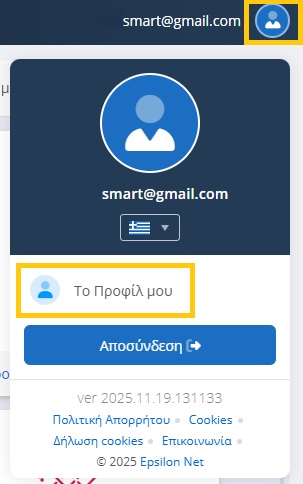
To create an API user, you will need to go to the main page of your account and from the button with your profile picture in the top right, select “My Profile”.
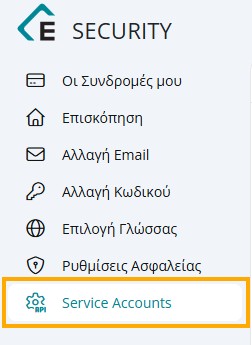
Then from the side menu on the left select Service Accounts.
On the top right select the Create Service Account button.

In the new window that will appear, select the Epsilon Smart Ergani Subscription (if you have more than one) for which you want to create the API user and keep both the User ID and Login Password, copying them to an external file (to see the password, click the button with the eye on the right). Finally, select Create.
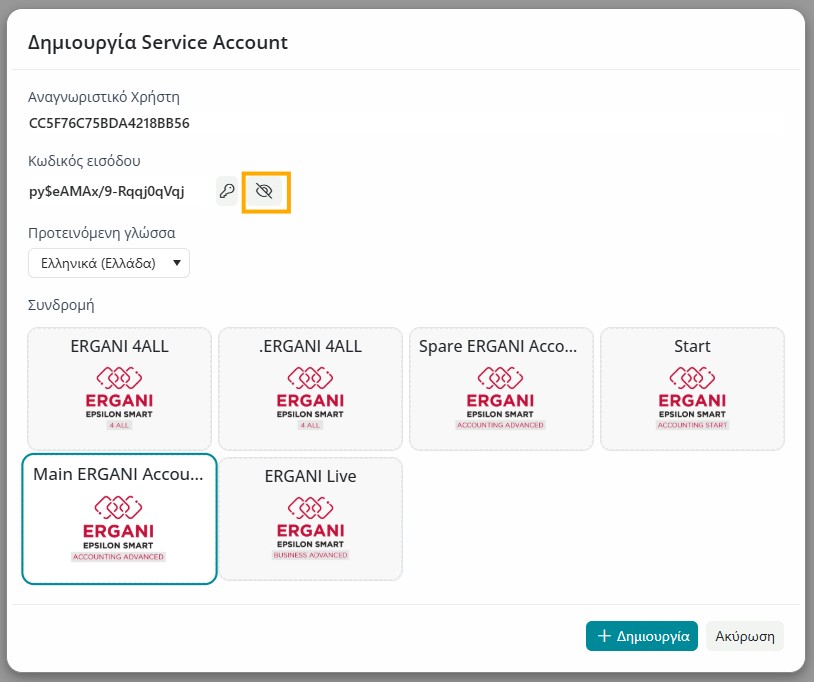
After creating the API user and have saved the User ID, Password and Subscription Key (See how to find the subscription key HERE), we can use these details to connect between Epsilon Smart Ergani and other services (Time Connector / Business / Pylon / Premium HRM payroll) using these details instead of our account email and password.
See Instructions for connecting Epsilon Smart Ergani with Business/Pylon payroll HERE
See Instructions for connecting Epsilon Smart Ergani with Premium HRM payroll (BUSINESS CONNECTION with internal accounting section) HERE
See Instructions for connecting Epsilon Smart Ergani with Time Connector HERE